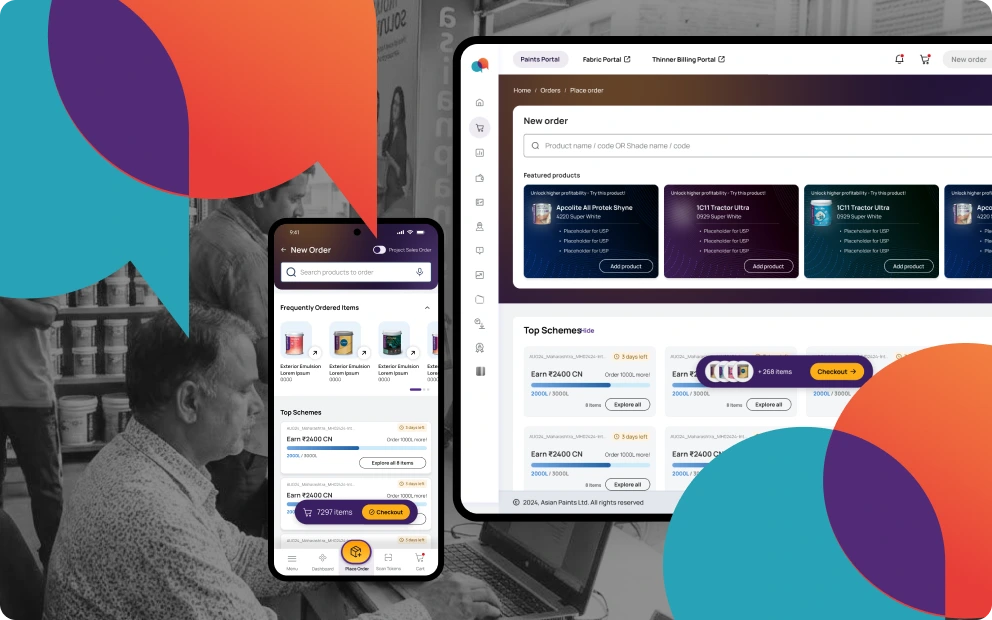
B2B · Order Tracking · Asian Paints | MyAwaaz

Reinventing
order tracking.

Turning a fragmented, call-dependent order-tracking journey into a clear, exception-first, self-serve experience — for the dealers who run their business on MyAwaaz.

Lead Product Designer Desktop Web
SAP ERP MDG Salesforce Azure
0%drop in status-related support calls
0×faster status lookup & reconciliation
+0%dealers self-serving order status
My role

Lead Product Designer.

Owned the order-tracking journey end-to-end — from research synthesis to developer handoff.

Research synthesis Problem framing Solution direction Wireframes UI design Validation Developer handoff

3 weeks explorations 2 weeks design alignment
Working with AI

The unit of work moved
from a slide to a prototype.

Before AI
  • The unit of work was a static mockup plus a written spec.
  • One direction was argued on flat frames — and committed early.
After AI
  • The unit of work is a working, clickable prototype.
  • Two or three real options are built and judged live, every iteration logged as it happens.
  • Exploration and decision-making moved into my design loop; engineering effort concentrated on productionising the resolved build.
AI in research — making sense of feedback at scale
  • Used AI to categorise, cluster and analyse a large body of dealer verbatims into recurring pain themes — turning scattered, unstructured feedback into a clear, prioritised signal.
  • Those clusters became the backbone of the research — feeding the heuristic evaluation, the affinity map and the pain points the whole case study is built on.
Speed & token optimization
  • Turned intent into clickable prototypes in minutes — many build-measure-learn loops in the time a single static round used to take.
  • Optimised token usage — chunking the verbatim corpus, reusing structured context and summarising iteratively — keeping large-scale analysis efficient and repeatable.
Context · What is MyAwaaz?

Where dealers answer
the questions of their day.

MyAwaaz is Asian Paints' dedicated dealer platform — a centralised place for dealers to manage their orders and sales. Order tracking sits at the centre: it's where a dealer answers the questions that run their day. Yet checking an order on the portal had not become the default.

0K+
Total Asian Paints dealers
across the network
0%
Status checks self-served on the portal
out of every status lookup
0%
Status checks made over a call
to a TSE / delivery driver
Setting the context

Default support-assisted habit,
not self-serve digital behaviour.

Two dealers back to back — one on a support call, one ordering on a glowing laptop
  • This work sat within the larger MyAwaaz revamp, aimed at reducing dealer dependence on physical support channels and moving order-status checks onto the portal.

  • Order tracking was a critical workflow because it sat at the centre of a dealer's day — money tied up, deliveries due, and contractors waiting on answers.

  • However, checking an order on the portal had not become the dealer's default. The habit was support-assisted, not self-serve.

Customer feedback

Five years of signal.

32K+ complaints and sub-3★ ratings collected over the past 5 years, through quarterly TSE-driven holistic dealer surveys. Order tracking was the single largest source of pain.

0K+
complaints / <3★ ratings
over the past 5 years
Share of complaints by module — not mutually exclusive
45%
Order Tracking (this case study)
40%
Order Placing
38%
Complaints
36%
Dashboard
The problem, as a story

When the screen felt complicated,
dealers reached for the phone.

The same loop, every time a dealer needed a status — until they abandoned the portal and reached for the phone. That abandonment was the habit the revamp had to break.

Dealer opens tracking on the portal1
Opens

A dealer opens tracking to check a live order spread across many invoices.

2.9K
-0.3K-10.2%
Dealer squinting at scattered status rows2
Reads

Scans and shifts through multiple rows entries for tracking updates.

2.6K89.8%
Confused, no clear delivered-vs-pending3
Stalls

Complication leads to confusion, no meaningful insights received.

-1.9K-72.1%
Dealer rings the ASM or driver4
Abandons

Simpler with a phone call — so the dealer rings the TSE or the driver.

0.7K25.0%

A phone call felt much simpler than tracking via the portal. Manual record-keeping became the norm to reconcile orders with financial documents.

The real shift

From a support-assisted habit
to self-serve digital behaviour.

Why this mattered?
For dealers
  • Simple numbers & order status
  • Less clarification calls
  • High lookout on promises & operations
  • Reconcilable audit trail
For AP & Dealer Relation
  • Operational transparency
  • Increased trust with dealer network
  • Higher retention in a competitive market
End customer relation
  • Higher fulfilment transparency
  • Stronger brand image
Two forces behind the abandonment

Was it the screens,
or the system beneath them?

The pull-back to the phone had two possible roots: how the portal was designed, and the complexity of the supply chain it sat on top of. The revamp had to weigh both.

Usability of the design

How the screens themselves were built — the failures that made a status hard to read at a glance. Examined later, through the heuristic evaluation.

Enterprise system complexity

The shape of the underlying order-and-logistics system the screen sat on top of — a genuine many-to-many reality. Examined first, below.

The core complexity

One order is never
a single row.

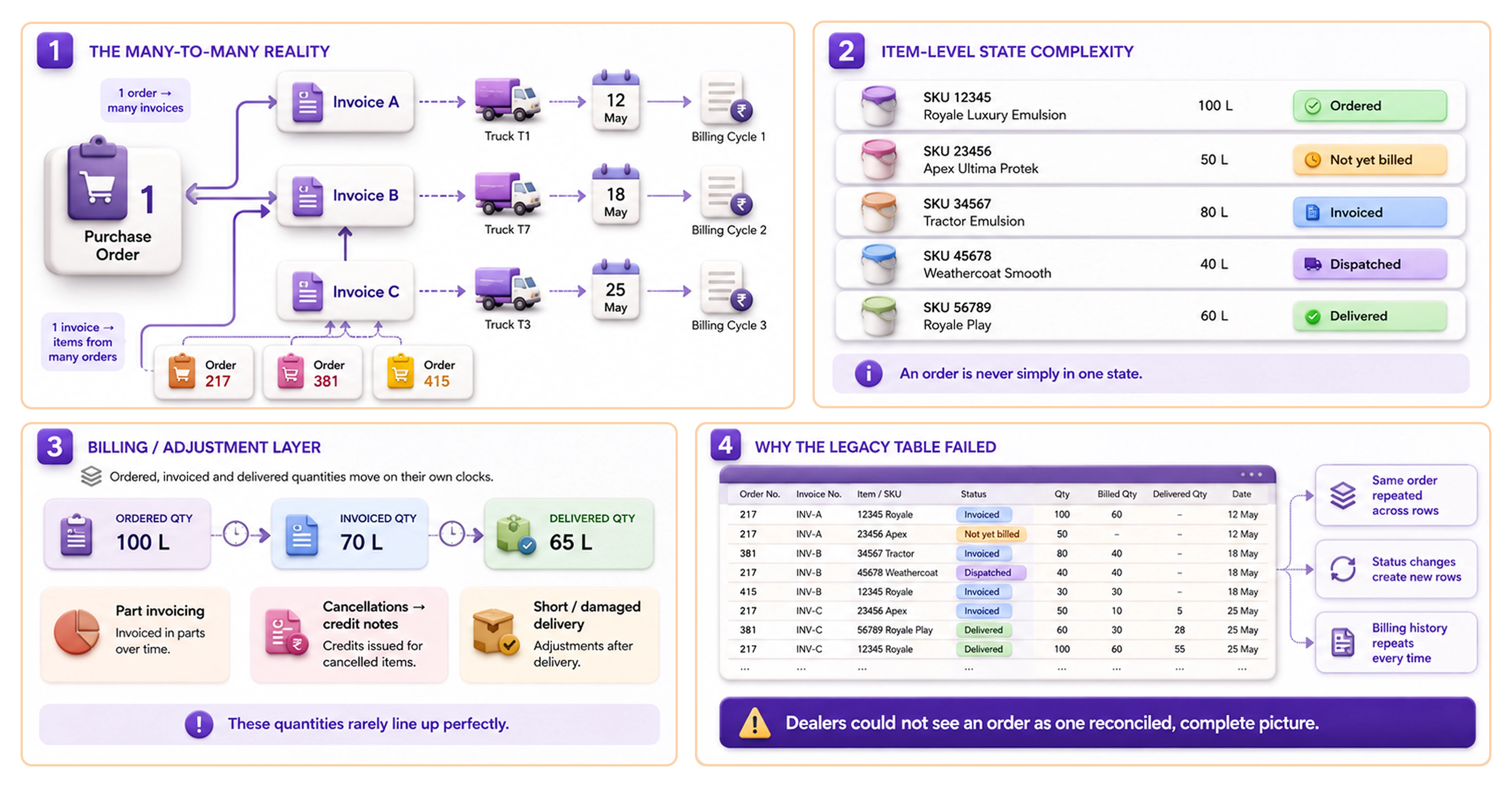
An Asian Paints purchase order doesn't behave like a single line in a table. One PO fragments into many invoices, dispatched on different trucks, arriving on different days and billed on different cycles — a genuine many-to-many reality.

The many-to-many reality: one purchase order fans out into many invoices, trucks, billing cycles; item-level state complexity; the billing/adjustment layer; and why the legacy table failed to show one reconciled order.
Fan-out, both ways

A single order is split across many invoices; and a single invoice can carry items belonging to more than one order. Each item sits at its own stage — ordered, not-yet-billed, invoiced, dispatched, or delivered — so an order is never simply in one state.

Billing on its own clock

Quantities are invoiced in parts, cancellations issue credit notes, and short or damaged deliveries adjust the figures after the fact — so what was ordered, what was invoiced and what actually arrived each move on their own clock.

What the legacy table did

It exploded this fragmentation onto the screen: the same order appeared across multiple rows mingled with other orders, each status change spawned a new row, and billing-quantity history repeated with every update.

The result

With the picture scattered this way, ordered, invoiced and delivered quantities rarely lined up — and the dealer could never see an order as a single, reconciled set.

Scope · the order-tracking module on the desktop dealer portal
Heuristic evaluation

What was breaking,
screen by screen.

A walkthrough of the legacy order-tracking screens — the heuristic failures that kept dealers off the portal and on the phone, pinned to where they actually happened.

Initial design brief

"How might we make order tracking on MyAwaaz clear and reliable enough that dealers self-serve order status — instead of falling back on phone calls?"

— and increase adoption of the MyAwaaz portal
Research

How we heard
our users.

Two pathways, deliberately different: structured field work to watch behaviour, and five years of unfiltered feedback to hear it at scale.

Pathway 1 — 1:1 interviews
80
Dealers
5
Cities

Mumbai · Delhi · Bangalore · Hyderabad · Kolkata. Aged 25 – 50, medium–high tech literacy — real order-tracking tasks on their own accounts.

Pathway 2 ~ 5 years of feedback
32K+
Complaints with ★ ratings

In-portal feedback accumulated across ~5 years — star ratings out of 5★ and verbatim commentary; 32K+ complaints in the most recent year alone.

01 · In their words

Feedback
Verbatims

Five years of complaints, distilled to the patterns that kept repeating.

02 · In their words

Field
Interviews

80 dealers across five cities, completing real order-tracking tasks.

03 · What we watched

Field
Observations

Behaviour we saw on screen, beyond what dealers told us.

“It just says ‘Dispatched’. Dispatched means what — today, next week? My customer is standing in the shop and I still have to phone the ASM for a real date.”

No actionable ETA; status isn’t a delivery promise
◍ P2.1

“One order, ten bills. Half came, half didn’t — and the screen won’t tell me what is still pending.”

Partial fulfilment is opaque
◍ P2.2

“What I ordered, what arrived, and what they billed are three different numbers. I keep my own diary to match them.”

Order–invoice–delivery don’t reconcile
◍ P2.3

“The same order is written across five rows, mixed in with other orders. I lose track of which line is mine.”

Mingled / repeated rows cause confusion
◍ P2.4

“Nobody warns me a truck is late. I find out only when the contractor calls, angry.”

No proactive exception alerts
◍ P2.5

“An item sat unbilled for days and blocked my credit limit — I couldn’t even place a fresh order.”

Stuck capital / blocked credit
◍ P2.6

“I screenshot the status and send it on WhatsApp, but it looks unprofessional and they ring back anyway.”

No clean way to share status
◍ P2.7

“I don’t rely on the app’s time. I call the driver — his number is what actually tells me when it’ll come.”

Drivers / phone trusted over the system
◍ P3.1

“My big project orders I track on a paper register and WhatsApp groups, not on MyAwaaz.”

Parallel manual tracking; system not trusted
◍ P3.2

“If the driver is in a hurry, I just sign. If something’s short, I find out later and it’s my loss.”

Forced blind sign-off; no grievance protection
◍ P3.3

“When a truck is delayed the contractor won’t wait — I need someone to act on it fast, or I lose the sale.”

No fast way to intervene / escalate
◍ P3.4

“My real question is ‘where is my white emulsion’, not ‘where is order 3821’.”

Dealers think in products / sites, not order IDs
◍ P3.5

“For a project I just want one number — how much delivered, how much still pending.”

Need a site / PO-level health summary
◍ P3.6

“LR number means nothing to me. Give me the driver, the area, and the time.”

Logistics codes are meaningless
◍ P3.7

“If I knew which trucks were landing today, I’d keep the loading boys and the godown space ready.”

No day-ahead view of arrivals
◍ P3.8

“A customer asks, ‘can you get me this by Friday?’ I need to see what’s already on its way to me before I promise.”

Can’t see incoming stock to commit
◍ P3.9
1

Asked to find one order’s status, dealers scrolled the long table; several opened the wrong order’s row first.

Findability failure from mingled rows
2

To judge a partial delivery, dealers opened several invoice rows and tried to total mentally; most phoned the ASM.

Can’t reconstruct an order from its invoices
3

Dealers misread the repeated billing-history rows as new shipments and double-counted quantities.

Ambiguous repeated history → errors
4

Asked “is product X arriving today?”, dealers left the portal and called the driver instead.

Bypass the portal for the phone
5

No observed dealer noticed the delayed / exception state in the table; it carried no visual weight.

Exceptions are invisible
6

For month-end records, dealers saved invoices one by one or kept paper; none used a consolidated export.

Records workaround; no bulk / GST flow
7

Older owners handed the laptop to a younger staff member or son to operate the portal.

Proxy use; low-literacy owners delegate
Personas

Three dealers,
three mental models.

PriyaThe Project Player
38Med–high literacyOperates laptop herself₹80L – 2Cr60% project / 40% retail8 – 15 orders/mo

Juggles many live project orders herself; tracks deliveries on a parallel diary.

  • One clear order view
  • Confident contractor updates
  • Commit incoming stock
  • Records without a diary
  • Pending stays hidden
  • Quantities don’t match
  • Order spread across rows
  • Manual partial totalling
  • One consolidated view
  • Delivered vs pending
  • Incoming-stock visibility
  • Self-reconciling numbers
  • Re-checking scattered rows
  • Maintaining manual diary
  • Caught without stock info
  • Keeps projects on schedule
  • Tracks every detail
  • Switches when portal’s faster
VikramThe Volume Contractor
44High literacyMulti-site power user₹3Cr+20 – 40 orders/mo5 – 10 concurrent

Supplies builders across many sites on tight cash flow; fast-moving power user.

  • Keep capital moving
  • Catch delays early
  • Fast audit records
  • Track many orders
  • Unbilled items block credit
  • No late-truck alerts
  • Can’t act on delays
  • Exceptions go unnoticed
  • Exceptions pushed forward
  • Cancel stuck stock
  • One-click escalation
  • Exportable audit records
  • Idle, blocked capital
  • Delays found too late
  • Falling back on calls
  • Driven by cash flow
  • Acts and escalates fast
  • High digital comfort
Rajesh & AaravThe Veteran Counter
Rajesh 56Aarav 26Low literacy (Aarav operates)₹25 – 60L retail

Father runs on relationships and phone; son operates the counter laptop.

  • Status in plain language
  • Know today’s trucks
  • Find orders fast
  • Serve walk-ins freely
  • “Dispatched” means nothing
  • Orders mingled in rows
  • Logistics codes confuse
  • Slow to find orders
  • Plain-language arrival times
  • Clutter-free screen
  • Day-ahead arrivals view
  • Fast order search
  • Code-heavy screen
  • Defaulting to calls
  • Owner needs son’s help
  • Relationships, quick service
  • Low digital comfort
  • Self-serves only if simple
Personas · Scenarios

What runs through
their minds.

The four who live these days

Strategic capital monitoring

Vikram — the Volume Contractor

Capital stuck past the SLA — and the one stuck order he can’t spot in time.

My credit limit’s maxed and half this money is just sitting there — I can’t place tomorrow’s order until something frees up.

Customer fulfilment tracking

Priya — the Project Player

Partial fulfilment is opaque — ordered vs delivered never reconcile.

My crew’s sitting idle at Horizon Tower waiting on 300 litres of Apex Ultima — how much has shipped, and when’s the rest landing?

Committing incoming stock

Priya — the Project Player

Incoming stock is invisible — no way to promise a date without chasing truck by truck.

I need 200 litres of Apex Ultima on the Riverside site by Thursday — can you do it?

Daily shop-floor prep

Rajesh & Aarav — the Veteran Counter

No day-ahead read of arrivals — “Dispatched” gives no real time.

If two big loads turn up together, we’ve no space and no extra hands — the whole counter jams.

Dispute resolution for delivered items

Rajesh & Aarav — the Veteran Counter

Discovers damage or missing items at delivery — no clear next step; raises a complaint separately or calls the TSE.

Sometimes we find items were damaged on arrival when we put them in the godown. It’s too late by then.

Post-fulfilment audit

Vikram — the Volume Contractor

Records scattered across orders — assembling GST invoices by hand eats a day.

Pull me all the bills for what actually arrived this month.

Affinity mapping

Four streams,
six design pillars.

Heuristics, feedback, interviews and observations — clustered into the challenges the new UI was built to solve.

01The signals — four research streams 02Affinitised into key user challenges 03Grouped into clusters
Heuristics
No single live status; each change adds a new row.
Orders split/merged into invoices; not shown as one set.
Fields scattered across a wide grid; mentally stitch rows.
Billing-quantity history repeats on every update.
Dense ERP grid; no hierarchy to guide the eye.
No quick product / site / order search; only a long table.
Status shown as system codes, not a delivery promise.
Delays, shortages & unbilled have no prominence.
Customer Feedback
“Dispatched” gives no real date; still phones the ASM.
One order arrives in part-deliveries; can’t see pending.
Ordered, delivered & billed quantities don’t match.
One order spread across many mingled rows.
No proactive alert when a truck is late.
An unbilled item blocks the credit limit.
No clean way to share status with a contractor.
Field Visit - Interviews
Trusts the driver’s phone over the app’s time.
Tracks big orders on paper & WhatsApp, not MyAwaaz.
Under driver pressure, signs blindly; shortage = loss.
When a truck’s delayed, no fast way to act.
Asks ‘where is my white emulsion’, not ‘order 3821’.
For a project, wants one number: delivered vs pending.
No day-ahead read of which trucks land today.
Can’t see incoming stock to commit to a customer.
Field Visit - Observations
Scrolled the long table; opened the wrong order’s row.
Opened invoice after invoice to total a partial delivery.
Misread repeated billing rows; double-counted.
Asked ‘is X arriving today?’ → left & called the driver.
Nobody noticed the delayed / exception state in the table.
Saved invoices one by one; no consolidated export.
Older owners hand the laptop to a younger son.
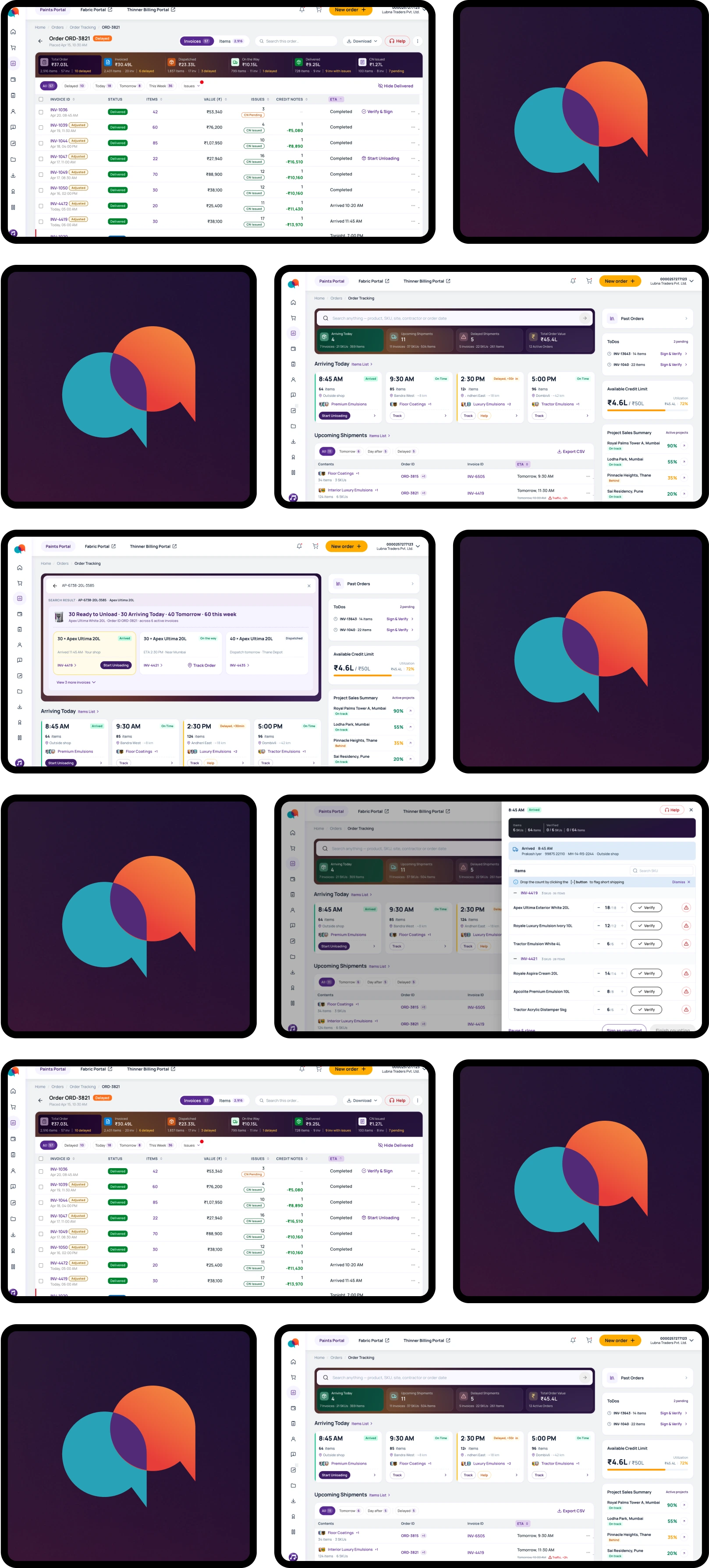
Consolidated Order View

Built — unified order detail, single Items + Invoices ledgers, side drawers, PO health bar.

One PO fragments into many invoices and rows; the whole order can’t be seen as a single set.

Partial fulfilment is opaque — no clear view of delivered vs still-pending items.

No site / PO-level “% delivered vs pending” summary for project orders.

Status Clarity & Exception-First

Built — exception-first dashboard, plain-language ETA + delay stamps, arrivals readiness, Contact-TSE.

No single current status; updates are scattered across many rows.

Status is a system state, not an actionable delivery promise / ETA.

Delays, shortages, unbilled items and payment-due are never surfaced proactively.

No professional way to share an order’s status with a contractor.

Findability & Navigation

Built — Sales-Assistant search (SKU / Site / Order), incoming-stock view, three-tier drill-down.

No day-ahead view of incoming arrivals to plan unloading labour and godown space.

Can’t see incoming / in-transit stock by product to commit it to a waiting customer.

Can’t quickly find a specific order, product or site in a long, dense table.

The system is order-ID-centric, while dealers search by product and by site.

Accuracy & Reconciliation

Built — cumulative ledger (Ordered = Unbilled + Invoiced …), Cancelled / Credit-Note columns.

Ordered, invoiced and delivered / billed quantities don’t reconcile across views.

Repeated billing history causes double-counting and erodes trust in the numbers.

Control & Cash Flow

Built — stuck-order cancellation → credit notes that free credit (Credit Pulse), escalate-to-TSE.

Stuck / unbilled items lock the credit limit, with no easy way to release capital.

When a truck is delayed there is no fast way to escalate before a sale is lost.

Verification & Records

Built — unloading verification + SKU count, ePOD ‘sign as unverified’, Past-Orders vault + bulk download.

Receiving is risky — driver pressure forces blind sign-off, with no consolidated count or grievance.

Records for GST / audit and late-found damage are hard to assemble after delivery.

Heuristics Customer Feedback Interviews Observations
The updated brief

How might we give metro-city dealers a single, exception-first view of each order — in plain delivery language and organised the way they actually think (by product and site) — so they can answer "when will it arrive?" in seconds, without piecing together scattered invoices?

Journey map · Track Order

Pain points,
by stage.

1
Reason to
check
  • Checks if a replacement order is placed for an out-of-stock product
  • Needs an update on an incoming delivery
  • No proactive alert when a truck is late
  • Trusts the driver’s phone over the app
  • No day-ahead read of what lands today
(exception-first dashboard surfaces delays & arrivals proactively)
2
Find the
order / product
  • Opens a notebook where the order ID was noted across 100s of ordered SKUs
  • Digs through many invoices to find a long invoice number
  • No product / SKU / site / date based search
  • Remembering a long order / invoice ID is difficult
  • Looks for “where is my white emulsion?”
  • Order mingled across rows → opens wrong row
  • Can’t see incoming stock to commit by Friday
  • Order split across invoices, not one set
(Sales-Assistant search by SKU / site / order + incoming-stock view)
3
Read & interpret
status
  • Opens order & reads its status
  • Combs through a long items list to update the restock schedule
  • No single current status; scattered rows
  • No specific ETA
  • “Dispatched” gives no real ETA
  • Partial fulfilment opaque — delivered vs pending
  • Wants one number: % delivered vs pending
  • No clean way to share status
(consolidated order detail · plain-language ETA · delivered-vs-pending)
4
Act on a problem
(exceptions)
  • Notes down the delays
  • Calls TSE for updated ETA
  • No actionable delays / new ETA forecast
  • No visibility on reliable recommitment to the customer
  • Vague reference makes it hard to pinpoint which / whose items are delayed
  • No fast way to escalate before the sale is lost
  • Stuck, unbilled item freezes the credit limit
(exception filters · escalate-to-TSE · cancel to free credit)
5
Receive &
verify delivery
  • Receives the truck
  • Counts & flags issues on paper
  • Signs the receipt
  • No way to immediately document issues
  • A later shortage either becomes a loss or needs complex auditing to raise a complaint
(unloading verification · ePOD “sign as unverified”, 4-hr grievance)
6
Records,
reconcile & close
  • Pulls records
  • Opens Tally to get the whole picture
  • Goes through files of printed CNs & invoices to cross-reference orders
  • Reconciles the math
  • Closes the order
  • Ordered / delivered / billed don’t reconcile
  • Repeated billing history → double-counting
  • No direct visibility of which CN belongs to which order and event
(reconciled ledger · Past-Orders vault · bulk GST export)
Confident Frustrated
Anxious —
is everything OK?
Hunting —
where is it?
Lost in
scattered rows
Stressed —
something’s wrong
Wary at
the dock
Closed &
reconciled
dealer can-dos pain points ( fixes ) Consolidated Order View Status Clarity & Exception-First Findability & Navigation Accuracy & Reconciliation Control & Cash Flow Verification & Records
Design process

Walking the dealer's day,
decision by decision.

Not grouped by feature clusters — but by the stages of the dealer's order-tracking journey, from the reason to check to closing the books.

Stage 1 · Reason to check

The dashboard —
triage at a glance.

  • The surface — the dealer’s home screen and the one they live on; it has to answer one thing before they search for anything: is any of my money, or any customer’s stock, in trouble right now?
  • The reframe — away from a neutral order list, toward a rolling-cash lens: where is capital stuck, and which sites / products are left waiting. The phone is context; this rich surface is the desktop counter view.
  • The anatomy — three operational zones plus a right rail: Zone 1 Today’s Arrivals · Zone 2 Upcoming Shipments, showing all the in-transit logistics · Zone 3 Active Orders for deeper dive · the right rail that triages exceptions across all three.

Who this serves — the dashboard answers all three personas at once: Rajesh & Aarav (the Veteran Counter) scan today’s arrivals and ready the counter before a truck shows up; Vikram (the Volume Contractor) needs exceptions pushed at him, so a stuck or slipping order finds him before the sale is lost; Priya (the Project Player) keeps a pulse on her credit and how her projects are tracking.

Stage 1 · DashboardZone 1 · Today’s arrivals — how the card evolved (4 versions)

A single row of cards, one per truck arriving today — scanned like a morning to-do list. Four versions, each watched in use before the next.

Explorations
1
  • Full info, no drill-down
  • Common affordances in-line
  • Information overload
  • Poor information hierarchy
2
  • Context-aware CTA
  • Reduced information density
  • Plate-as-title is the wrong hierarchy
  • Reduced the information needed for at-a-glance use
3
  • Pre-attentive scan on the time axis — the planning question is answered in the first half-second; the dealer skims four cards, reading the big time stamps first.
  • Hierarchy ladder maps to behaviour: arrival time → delay → load (plan labour & space); anxious? driver & truck info, a call away.
  • Knowing what’s coming when at a glance matters more than driver details for resolving anxiety.
4
  • Restored the location information for anxiety resolution
  • Minor visual tweaks for better hierarchy
  • Driver and vehicle details moved a click away; categories now lead — answering what’s coming, when.
Final Design
The shipped card Shipped

Driver and vehicle details moved a click away; categories now lead — answering what’s coming, when.

  • Better hierarchy
  • Mapped to the dealer’s mental model
  • The right info, exactly when needed
Expectations

Answer five questions, in order:

  • When does it land?
  • Can I trust that time?
  • How big is the unloading job?
  • Should I worry about it?
  • What do I do next?

And never feel like a list.

The insight

Truck number & driver matter too — but at the gate, for matching paperwork, not while planning the day. Telling gate-info from planning-info is the insight the redesign turns on.

Constraints
  • About four trucks a day, so the row holds four cards.
  • Every label readable at a glance on a busy floor.
Trade-offs accepted
  • Glance over completeness — secondary detail moved into the truck drawer, not onto the card.
  • Time over documentation — plate and driver dropped to a quiet footnote.
  • Calm over loud — a small stamp and ghost buttons, not bright pills and filled CTAs.

Where each CTA leads — the card as a hub

One card, four doors: click it for the truck’s contents, Track for the live map, Help to reach the TSE, and Start Unloading once it has arrived.

Stage 1 · DashboardZone 2 · The logistics hub

The operational view of what is to arrive over the next 2 business days — to help preparedness and forecast issues.

  • Contents lead, not the invoice. A dealer recognises a shipment by its contents (“Floor Coatings”), not invoice digits — so contents & pack-shots take the first column for better recognition.
  • Filters: two windows plus a sequential “Delayed”. Tomorrow and Day after filter by arrival window; Delayed is a separate filter that cuts across both, so the dealer can jump straight to whatever is slipping, whenever it was due.
  • The ETA cell does several jobs. Live ETA in black, original struck through, delay reason + offset in red (“Traffic, +2h”).
  • Local sync, Export CSV, and “+n” multi-order pills — the many-to-many reality, made glanceable, updated live.

Why the strikethrough, not one number? Only the new time hides that it slipped (erodes trust); only the delay leaves the dealer doing maths; showing both answers when, by how much, and why at a glance.

Stage 1 · DashboardZone 3 · Order-health cards — 3 options

The macro pipeline — one card per active PO, answering at a glance: where is this order’s money, and do I need to act?

Expectations
  • See where each order’s money sits.
  • Know at a glance whether an order needs me.
  • Trust the card not to cry wolf.
  • Open the full order when I want.
The insight

Scanning a dozen orders, the dealer needs each card to say do I act? — not to describe everything. The biggest pile of money isn’t always the urgent one.

Constraints
  • Up to a dozen orders on screen — each card must read in two seconds.
  • Cards must look like siblings of the past-order cards (one chrome).
Trade-offs accepted
  • Information density per card ↓, scannability across the grid ↑.
  • Visual richness ↓, semantic clarity ↑.
  • Direct in-card actions ↓, separation of scan-and-act surfaces ↑.
Show the whole picture Option 1

Full pipeline bar — every number, a four-colour strip + legend.

Needs

Pipeline let dealer gauge an order by tracking the monetary distribution. Honest, transparent & complete.

Dealer is overwhelmed.
  • “So many colours…”
  • “Which of these twelve?”
  • “Where do I start?”
What’s still wrong
  • Not quick to scan in a grid of 12 cards.
  • No priority. It informs: it doesn’t triage.
Show the headline number Option 2

Shows the biggest pile (descriptive) and common status

Needs

A grid of 12 pipeline cards is clutter. Showing only the biggest pile works along with a one-word status for gauging at a glance.

Lead to confusions & questions.
  • “Is it on track or stuck?”
  • “Is the ₹24K what's late, or just the biggest bit?”
  • “₹29K of ₹48K — the rest?”
What’s still wrong
  • But now the card carries two separate signals that don’t reconcile — a money amount and a health word.
  • The patch confused more than it cleared; and with nothing ranked, a healthy order looks as urgent as a stuck one.
Show what needs action Option 3 · shipped

Shows what to act on (prescriptive), based on the status

Needs

Two un-reconciled signals was disorienting. Instead, show what needs action based on status, & not just describe the largest pile.

Dealer could decide.
  • “three of four need me.”
  • “two stuck in traffic.”
  • “one overdue — cancel, free credit.”
What worked
  • Now it leads with the problem and the reason. The dealer acts in seconds.
What changed from Option 2 to Option 3 — and how I caught it?
Stage 1 · DashboardThe Right Rail - Archive and Baseline Information

This section allows the dealer to access the past orders and displays urgent alerts on pending tasks, bottom-line information like Credit Limit and Site completion status, acting as a guide/reference for them to interpret the 3 main zones of the dashboard contextually.

Past Orders
To Dos
Credit Limit
Project Sales Summary
  • Four blocks earned a place — Past Orders, To-Dos, Credit Pulse, Project Sales. Order Health & Needs Action fell away (unbounded or already shown elsewhere).
Stage 2 · Find the order / product

Beyond the glance —
search & drill-down.

  • Beyond the glance. The dashboard answers what needs me? at a glance. This is the next step — when the dealer looks something up on purpose, or follows a curiosity down into the detail.
  • Two ways in. A search for a specific order, product or site; and an items view that answers the standing question — “what am I still waiting on, across all my orders?” Both let the dealer look things up by product“where is my white emulsion?” — not by invoice number.

Who this servesRajesh & Aarav want to find one specific order or product in seconds instead of scrolling and reaching for the phone; Priya needs to see what’s still on its way — across all her orders — to commit incoming stock to a waiting customer.

Stage 2 · FindSearch — one box for product, SKU or site
By SKU
  • Open the invoice it’s on
  • Track its truck
  • Open the SKU’s full detail
  • Jump to the order
By product
  • Drill into a specific SKU
  • Open an invoice
  • Open the order
By site
  • Open any of the site’s orders
  • See its details
Item not ordered
  • Nudge to place order
  • No sudden dead ends
Stage 2 · FindThe Items List drawer — everything you’re still waiting on
  • Search finds one thing. The Items List answers the bigger question — what am I still waiting on, across all my orders? — in one place.
  • So we built a drawer that lists every undelivered SKU across all open orders, letting the dealer plan around what’s coming instead of chasing it order by order.
1
What’s arriving when?

Everything you’re still waiting on, from every order, in one place — sorted by arrival, each line showing the product, how much, and where it’s reached. Click any product for its full story.

2
Why it’s grouped by order

Four ways to stack the same products: by status scattered tomorrow’s run into piles you’d re-add; by window echoed the tabs; a flat list hid whose order was whose. By order won — each product under its order, clear at a glance.

Stage 2 · FindWhere the entry point lives — same drawer, 3 doors

Discoverability isn’t loudness. Riding the dealer’s existing scan beat a strip that shouted for space.

A · Right-rail cardExplored

Always present in the side rail.

Pros
  • Always visible, on every screen
Cons
  • Competes with the rail’s other cards
  • Sits far from the orders it’s about
B · Full-width stripExplored

A loud band below the metrics.

Pros
  • Impossible to miss
Cons
  • Eats a full band of prime space
  • Loud, but didn’t earn its height
C · Per-zone linksChosen

“Items List ›” rides each zone heading.

Pros
  • Sits right where the dealer is already looking
  • Opens the drawer pre-set to that zone
Cons
  • Quieter — relies on the dealer noticing the link
Stage 3 · Read & interpret status

The order, whole —
one consolidated view.

  • What it is — where the dealer opens a single order to manage it. Unlike the dashboard zones, which are live and disappear (a truck is gone once it unloads), this page stays — it’s the lasting record of what the dealer committed to.
  • The hard part — one order is split across many invoices and trucks. This page has to pull it back into one view, and make its numbers add up, so the dealer can trust them.
  • What the old screen did — one order sprawled across many mingled rows; its billing figures repeated with every update until ordered vs billed was a guess; ordered, delivered and billed never reconciled. Dealers ended up keeping a paper diary, and calling the ASM to piece an order back together.

Who this servesPriya: several live project orders, each arriving as fragments, tracked in a parallel diary because ordered, delivered and billed never matched — the reconciled funnel is what retires the diary. Rajesh: opens it to read a single plain status and a real ETA instead of scattered rows. Vikram: reads the same page money-first — unbilled value and credit notes, stage by stage.

Stage 3 · Order detailStructure settled — three calls before any layout

An order is a list of products, so the instinct is one view, by product. But one order is split across many invoices and trucks — and an invoice can carry more than one order’s items (the order–invoice tangle is laid out earlier). Three calls came before any layout could be drawn.

Do we even need an invoice view? The dealer thinks in products.
Yes
Delivery happens in invoices. “What’s coming & when?” needs it. So the order keeps two views: Items and Invoices.
Two separate surfaces, or two lenses on one order?
Two lenses
An invoice can span orders, so each is scoped to this order — its share only. The dealer stays anchored.
Does the invoice view need its own front door?
No
A standalone invoice list is a filing cabinet, not a workflow. A single invoice opens as a drawer from search, the hub, or the items list.
Stage 3 · Order detailThree layouts for the two views — A / B / C

With the structure set, one question was left — placement. Where does the order summary sit, where do the two views go, and where do the urgent cases show up? Three full, clickable layouts were built and judged by how a dealer would actually read the page. Each sketch below shows block placement only, not the content inside.

Order header · total
Order Summary + Stagewise filters
AllDelayToday
Special / attention-worthy cases
Items / Shipments toggle
Search
Items / Shipments table

A · Split view — summary rail beside the table

Considered
Strength

Summary and table stay in view together; the dealer can filter without losing sight of the table.

  • Order summary and the stage filters live in a fixed left rail; the table fills the right.
  • The Items / Shipments toggle and search sit on top of the table, on the right.
  • ‘Special / attention-worthy cases’ is a small block pinned to the bottom of the rail.
  • Filter from the rail while the table stays on screen — nothing scrolls away.
  • One stable frame: context on the left, detail on the right.
  • The rail eats width, so the table — the part with the most columns — is left narrow.
  • The attention block sits low in the rail, easily missed below the fold on a phone.
  • Two scroll regions, rail and table, can fight on a small screen.
Order header · total
Special / attention-worthy cases · alerts band
Delayed truck
Critical SKU
Order Summary + Stagewise filters
Search
Items / Shipments toggle
Items / Shipments table

B · Exception-first — attention cases on top

Considered
Strength

Whatever needs action is the first thing the eye lands on.

  • A ‘Special / attention-worthy cases’ band leads the page, carrying the urgent cards — delayed truck, critical SKU.
  • Order summary + stage filters sit below the band; a search + toggle row separates summary from table.
  • The table runs full width at the bottom.
  • Problems and their actions sit above everything — a dealer in a hurry sees them at once.
  • The full-width table keeps every column readable.
  • The routine overview is pushed down; a calm order looks as loud as a stuck one until you read the band.
  • On the common days when nothing is wrong, the band is empty space the dealer scrolls past.
  • It pre-decides what counts as urgent — but a dealer’s ‘urgent’ shifts daily; a small overdue SKU can outweigh a late truck.
Order ORD · total
Invoices / Items
Search
Order Summary + Stagewise filters
AllDelayedTodayTomorrowIssuesHide del.
Items / Shipments tableSpecial / attention-worthy cases surface via the stage filters

C · Summary-first — summary ribbon, full-width table

Shipped
Strength

The whole order, read top to bottom, in one honest frame.

  • Order summary + stage filters sit as one full-width ribbon under the header; the toggle and search live in the header itself.
  • The Items / Shipments table runs full width below.
  • ‘Special / attention-worthy cases’ isn’t a separate block — it’s reached by clicking a stage filter (Delayed, Issues) on the same table.
  • One reading order, no competing panes: order total → where it sits by stage → the line items.
  • The table gets the full page width — it’s the densest part (ETA revisions, issues, credit notes).
  • The same filters that summarise also drill in, so ‘urgent’ is whatever the dealer picks, on demand.
  • Attention-worthy cases aren’t surfaced on arrival; the dealer applies a filter to isolate them.
Why C was chosen — and the trade-off it carries

C shipped. The order-detail page is a screen the dealer opens many times a day to scan, not a dashboard they sit and study — so the everyday read was optimised over the exception.

Why it won
  • The table earns the full width. With 57 invoices and columns for ETA revisions, issues and credit notes, the line list is the densest, most-consulted part of the page. A’s rail and B’s band both steal width from the exact thing the dealer opened the order to read.
  • One honest reading order beats a curated one. A buries context in a side rail; B decides for the dealer what’s urgent and pins it on top. C lets the order tell its own story top to bottom — total, then position by stage, then the lines — and trusts the dealer to drive.
  • ‘Urgent’ isn’t a fixed category. A late truck isn’t automatically the day’s biggest problem; one critical SKU stuck at depot may matter more for tomorrow’s counter. A hard-coded alert band (B) freezes one definition of urgent and becomes dead weight on the many days nothing is wrong.
The trade-off accepted

C’s cost is real: the attention-worthy cases are one click away, not zero — the dealer has to pull a filter to isolate them. We took that deal for three reasons.

  • Nothing is actually hidden. Each stage segment in the summary ribbon carries its own delayed / issue count (‘6 delayed’, ‘9 with issues’), so the dealer sees that something is wrong at a glance — the filter only isolates which ones.
  • The click matches how dealers triage. They arrive with a specific question — ‘what’s delayed for today?’ — and a filter answers exactly that. A fixed band answers a question they may not be asking.
  • A permanent alert band breeds banner-blindness. Shown every day, mostly quiet, it stops being read; a filter the dealer pulls is always relevant, because they pulled it.

Net — C trades one filter click (a small, recoverable cost) for a full-width, uncluttered table every single time (a large, everyday gain). On a screen built to scan, the everyday state wins — and the ribbon’s per-stage flags make sure the exception is never a surprise, only un-isolated.

Stage 3 · Order detailFilling the two views — why the stages aren’t a simple pipeline
Invoices viewmoney & invoices
Summary — six money-stages (Total Order → Invoiced → Dispatched → On the Way → Delivered → CN Issued), read value-first; CN Issued is its own stage so credit notes are never buried.
Table — one row per invoice: Invoice ID · Status · Items · Value · Issues · Credit Notes · ETA; ETA shows the revision — original struck, new time + reason.
Filters“what needs me, and when?” Today / Tomorrow / This Week order invoices by arrival; Delayed & Issues pull trouble up — never 57 rows to find the 10 that matter.
Items viewquantities & billing
Summary — a quantity funnel with billing made visible (Total Order → Unbilled → Invoiced → Dispatched → On the Way → Delivered); Unbilled leads (₹6.54L · 515 items). CN Issued drops off — it’s invoice-level, not item.
Table — one row per product, a quantity waterfall (Product · Ordered · Unbilled · Invoiced · Dispatched · On the Way · Delivered), each cell a count + value; inline issue flags. No ETA — a product has no single arrival, the invoice does.
Filters“which products need me?” Delayed, Damaged & Short-Shipped isolate the broken; Category narrows by line; click a stage to filter the table to it.

One toggle, no disorientation — both ribbons read money by stage, left to right, so the second view is familiar the first time it’s seen.

From the core view to the shipped page — the enrichments that answered the rest of the dealer’s questions

Invoices view
Search within the order

“Where’s this invoice or credit note?” — jump straight to it instead of scrolling every invoice row.

Sortable columns (quantity / value)

“Which invoices carry the most value — or the most issues?” — rank any stage to bring the biggest exposure to the top.

Filters

“what needs me, and when?” Time filters (Today / Tomorrow / This Week) order the trucks by arrival; Delayed and Issues pull trouble to the top.

Items view
Search within the order

“Where is this one SKU?” — jump straight to a line instead of scrolling 119 item rows.

Sortable columns (quantity / value)

“Which products carry the most value — or the most damage?” — rank any stage to bring the biggest exposure to the top.

Filters

“which products need me?” Delayed, Damaged and Short-Shipped isolate the broken ones; Category narrows by paint line.

Multi-select rows

“I want to act on these specific lines together, not one by one.” — row checkboxes with a running Selected count.

Selection action bar (FAB)

“I’ve picked some lines — what do they add up to, and what can I do with them?” — a floating bar rises with a running tally (count · total items · total value) and the actions that fit the picked lines.

Invoices view
View / download / share: Invoices · ePODs · CNs · Items

From the Invoices view — pull or share any invoice’s PDF, its ePOD or its credit note from the row, or bundle a selection into one download.

Invoices view
View / download / share: Invoices · ePODs · CNs · Items

From the Invoices view — pull or share any invoice’s PDF, its ePOD or its credit note from the row, or bundle a selection into one download.

Items view
View / download / share: Invoices · ePODs · CNs · Items

Pull or share one product’s paperwork — the invoices and credit notes tied to it — without leaving its row.

Items view
View / download / share: Invoices · ePODs · CNs · Items

Pull or share one product’s paperwork — the invoices and credit notes tied to it — without leaving its row.

Sign & Verify

Confirm receipt, log shortages, raise a problem on arrival.

Unload

“What actually came off the truck?” — tick each SKU received, short or damaged as it’s unloaded, before signing.

Track

Follow a truck live — driver, position, revised ETA.

Help / Support

“Something’s wrong the screen can’t fix — who do I call?” — one click to the dealer’s TSE, in context.

Cancel / modify selected items

“Cancel just these items, by quantity — not the whole order.” — a per-SKU dial-in modal scoped to the ticked lines, confirmed with an OTP.

Cancel entire order

“Call the whole thing off.” — the heaviest action, kept in the kebab and nudged toward partial-cancel first.

Stage 4 · Act on a problem

Cancelling &
escalation.

  • What this is — what the dealer reaches for when something’s wrong: cancel stuck stock to free up credit, push a delay up before the sale is lost, or refuse goods that can’t stay.

Who this servesVikram, the Volume Contractor on tight cash flow: capital stuck in unbilled items freezes his credit limit, and a delay he hears about too late costs him the sale. Cancelling to free credit, and escalating fast, are his two levers.

Stage 4 · Act on a problemCancellation — Two hard limits set the rules
Transit wall

You can’t cancel what’s already moving. Once units are on the road or delivered they’re out of reach — they go through Returns.

GST is locked

A GST tax invoice can’t be deleted. You can only reverse the items on it with a credit note, never erase the invoice itself.

Stage 4 · Act on a problemCancellation Flow

One System. Two paths. Cancel the entire order or a selected few with the same experience. Scroll the map sideways to travel the full flow.

Stage 4 · Act on a problemAfter cancelling, the order remembers
Invoices view
Reversed, never edited

An invoice can’t legally be edited or cancelled — cancelled items are reversed with a credit note instead.

Settled / Adjusted flags

Fully-reversed wears Settled when all items in that invoice are cancelled; partial cancellation wears Adjusted.

A matching +₹ CN

Nets the row to zero, with the CN Issued flag and the count of items cancelled.

Hard stop past dispatch

Invoices already on the way or delivered can’t be cancelled at all.

Items view
Cancelled / Partially Cancelled flags

Next to the SKU name for easy identification and feedback.

Struck-through values

Next to the updated numbers for zero confusion, so that the numbers always add up.

Stage 4 · Act on a problemWhere the dealer sees the credit notes

Every cancellation that touches billed stock issues a credit note. Those notes aren’t tucked away in one place — apart from the Statement of Accounts section, inside order tracking they surface wherever the dealer is already looking: the Credit Notes column on each invoice row, the CN Issued tab in the Invoices Drawer, the Issues & CNs tab inside a product’s drawer, the Download menu (credit notes as PDF), and the Activity Log for bulk reconciliation. This is done for contextual information and easy reconciliation — and the cancellation confirmation shows the count straight away too.

Credit Notes column

On each invoice row.

CN Issued tab

In the Invoices Drawer.

Issues & CNs tab

Inside a product’s drawer.

Download menu

Credit notes as PDF.

Activity Log

In the activity log for bulk reconciliation.

Stage 4 · Act on a problemEscalation — pushing a problem up fast
Escalate, don’t strand — Contact TSE
  • The moment — a truck’s delayed and the contractor won’t wait; the dealer needs someone to act on it fast, not a phone tree.
Where it opens from
  • Two entry points, both sitting on a delay: the header’s Help / Contact TSE button, and a Help action inside a delayed shipment’s invoices drawer.
The panel
  • Both open the same TSE contact panel — part of the same side-drawer family — so the dealer can push the delay up without leaving the screen, right where they spotted the problem.
Returns — out of scope, on purpose

Units past the Transit Wall could be returned later, but a return almost never happens; when something is wrong it’s caught at the door (damage / shortage → credit note). Returns stay routed through the TSE, off-platform.

Stage 5 · Receive & verify delivery

Receiving the truck —
a count the dealer controls.

  • The surface — the dealer at the dock, counting what came off the truck, flagging anything damaged or missing, and signing the receipt (the ePOD). Everything downstream — every credit note, every reconciliation, every signature — comes from what gets ticked here, so this row is the smallest unit of trust in the whole flow.

Who this servesthe Veteran Counter at the dock. When the screen is unreadable, this pair defaults to a call — the very behaviour the revamp must replace — so the counting flow is built for the proxy reality, where whoever is free has to work it amid the noise.

Stage 5 · ReceivingThe offloading journey
1.Truck arrives

The dealer opens its card to start receiving.

2.Count, product by product

Confirm, flag damaged, or flag short — any mix, mid-count.

3.Sign off

Sign & Verify, or Sign as Unverified to clear the truck and keep a window.

4.ePOD generated

The receipt is created and saved with the order.

All of it while the crew unloads, the driver hovers to leave, and a contractor may be on the phone.

Stage 5 · ReceivingThe unloading surface — Drawer.
Version Shipped
Stage 5 · ReceivingThe verification row — four ways to flag, A / B / C / D

Each row is one product. The dealer confirms it all arrived, flags some short, or flags some damaged — short & damage can land on the same row, any order. Fit all four into one row without it becoming a form.

Constraints & Goals

1.Counting starts honest

Every row starts with a filled counter — reduce it by the count of short / damage, so counting stays quick.

2.The numbers must hold on their own

No discrepancies from human error between the number of short shippings and damages.

3.The hardest user, in the hardest place

When Aarav is busy, 55+ owner Rajesh works it — phone in hand, noisy floor, interrupted. So the row must resist mis-clicks and read its state at a glance, ending the costly blind sign-off.

A · Two pills
B · Issues stacked
C · Subtract-and-morph
Option BOption C
Why C won

In practice, it gets out of the dealer’s way. Nine times in ten nothing is wrong — one click to Verify and the row is done. On a short count, lowering the number flips Verify to Flag Short; a quiet icon-only button opens the damage pane only when it’s needed.

The quiet brilliance: damage or shortage can come first, in any order. The system choreographs the + / − counters behind the scenes — disabling whatever would break the arithmetic — so the totals never drift into disarray, without ever demanding the dealer’s full attention.

Stage 5 · ReceivingSigning off — and the ePOD
Case 1 · Finish Countingthe clean path

Activates only once every item is verified. Nothing is filed until the dealer signs; one ePOD per invoice, credit notes queue automatically.

Case 2 · Sign as Unverifiedthe safety valve

The driver leaves now, and a 4-hour window lets the dealer raise damage / shortage later from Past Orders — the credit note auto-applies.

In short — receiving used to be a signature under pressure, where any shortage quietly became the dealer’s loss. This makes it a count the dealer controls: honest by default, short & damage in one gesture, consistent by construction, protected either way.

Stage 6 · Records, reconcile & close

Closing the loop —
the final record.

  • The surface — what the dealer (and their accountant) come back to once an order has settled: the permanent, read-only record — for GST filing, disputes, and reorders.
  • Legal Constraint — Indian GST law sets the rules. An issued invoice can’t be edited — ever. So this surface has to show three truths at once, without mixing them up: what’s true now (the live math), what was originally ordered, and the unchangeable legal invoice.

Who this servesVikram, who needs clean records he can export for audit, and Priya, who kept a manual diary because ordered, delivered and billed never reconciled — both now pull the final math and the paperwork from one read-only page.

Stage 6 · Past ordersWhere settled records live — folded into Past Orders

Settled orders and their documents live with the order itself, inside Past Orders. There's no separate place to file or hunt for paperwork — every invoice, ePOD and credit note sits with the order it belongs to.

Fold into Past Orders

Everything lives in a dedicated Past Orders archive — no second place to learn or keep in sync.

The archive — browsing settled orders

Grid viewscan by card
List viewscan by row
Stage 6 · Past ordersThe settled-order page — the final record, read-only

Once an order settles, its detail page becomes a read-only record — the same Invoices and Items tabs the dealer already knows, but frozen, with a settlement summary on top and the order’s full history a click away.

Invoices viewmoney settled
Items viewquantities settled

The Activity Log — the order’s black box

1
A money headline first

Totals the order’s exceptions by type, legible before a single row is read.

2
Filters for what’s unfinished

Jump straight to claims that still need chasing.

3
Each entry carries its proof

A Verified / Unverified pill and the credit-note amount on the line.

4
It doubles as the CN drawer

“Download All CNs” turns the log into the order’s credit-note bundle.

In short — the settled order stops being a scavenger hunt. Records, credit notes and the final math now sit with the order, so the dealer can pull any document, trust the numbers, and settle a dispute from one read-only page.

Result & impact

Calls, deflected.

Metrics from the system — before → after
Order-status checks self-served on the portal / month
25%
76%
↑ self-serve
Status / “where is it” calls to the TSE / ASM / month
42%
7%
↓ 83% calls
Order-status checks abandoned for a phone call
75%
24%
↓ abandonment
Usability testing — before → after

Dealers were asked to complete a few key tasks they normally did off MyAwaaz — one of them: tracking an order and reconciling it. Scores out of 5.

4.1
Usability
from 2.5
4.3
Information
from 4.1
5.0
Usefulness
from 4.6
Learnings

Lessons that
stuck.

Turning a fragmented, phone-first tracking habit into something dealers would trust was never tidy — scrapped layouts, dead-ends, and plenty of “back to the drawing board” days. It was a classical design process — research, synthesis, iteration, judgment — run with AI as an accelerant; the lessons that stuck live where the two meet.

01Design the dealer’s question, not the supplier’s data+
The screens were never the hard part — the many-to-many reality underneath was. The unlock was reframing one order, shattered across invoices and trucks, into the single thing the dealer actually asks: where is my stuff?
02Solve the journey, not the screen+
Fixing the dashboard, the search and the order page one at a time kept breaking reconciliation somewhere else. The flow only held once I treated the six surfaces as one connected decision.
03Correct by construction beats correct by effort+
On the verification row and the cancellation engine, the counts had to hold by design — never by the dealer’s arithmetic — because every credit note, ePOD and reconciliation depends on them.
04AI changed the cost of being wrong, not the calls+
Building clickable prototypes with AI let me test an idea with real data the same hour I had it — which is how a misleading order card surfaced in testing, not after launch. The tooling made exploration cheap and brave; which option to keep stayed a design judgment.
05AI’s biggest lift was upstream, in research+
Clustering years of scattered dealer verbatims into clear pain themes — weeks of manual sorting — gave the case study its backbone and freed my time for the design itself.
Future scope
Off-platform today

Self-serve returns

A return is still routed entirely through the TSE today; a real in-product returns flow would close the last off-platform loop.

Stub today

Late-damage & grievance, fully built

The post-delivery damage report exists only as a stub; building it out completes the verification-to-credit chain.

AI

Predictive, AI-driven delay alerts

Surface a slip before it’s reported, not after, and draft the escalation — extending AI from the design process into the product itself.

Next

Let's make it
transcend.

soumyajyotihalder2021@iitkalumni.org